-min%20(1).webp?width=100&height=75&name=Fruit%20Salad%20%26%20blackcurrant%20Logo%20(7)-min%20(1).webp)
There are occasions when your customers wish to cancel orders that are already in the process of being picked by our centres.
Until now, this has required you to reach out to our Customer Operations team who would try to prevent the order from being dispatched on a best endeavours basis.
You are now able to manage this process yourself without the need to contact our Customer Operations team, providing the order has not already been dispatched. If the order has a status of “Picking”, you will now see an option to “Request Cancellation”, as per the image below. To see this option you must select and load the order from the Order Enquiry.
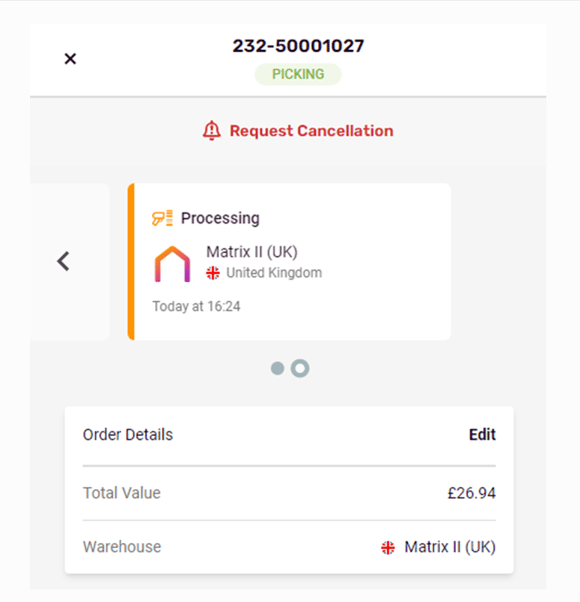
You will receive a notification once the order has been successfully cancelled, should you opt in to receive these notifications, which you can do via the settings area of the app.
For orders of this type, we will have already picked the items and, as such, when cancellation is requested the standard picking fees will be applied, along with a charge for returning the items to the pick face, as per the “Restocking” charge on our latest tariff.
Please be aware that orders which have a status of “Packed” can no longer be cancelled as they will have either been dispatched or will be in carrier collection cages, along with many other parcels. The Request Cancellation option will therefore not be available for orders of “Packed” status.
The above functionality is only available on our latest app which can be accessed here.
Should you have any further questions or issues with this update, please do not hesitate to contact our Customer Operations team who will be able to assist further.
Kind regards
fulfilmentcrowd